Event Home Page
Web Platform · Events.com
Web Platform · Events.com
Event Home Page
Replacing a confusing post-creation redirect with a guided onboarding hub, improving new user setup completion and giving experienced organizers a live event dashboard.
Impact
100M+
Revenue supported through product features designed at Events.com
2× More
User engagement with widget-based layout vs. previous side navigation in testing
10 Users
Tested across two rounds. New and experienced organizers both validated the redesign.
Role
Primary Designer
Deliverables
User Testing, Wireframes, User Flows, Visual Design
Company
Events.com
Type
Web Platform
Business Context
Events.com scaled from $0 to $100M in revenue during my tenure, and self-service user growth was a core part of that trajectory. But new self-service organizers were dropping off during setup, creating support burden and leaving revenue on the table from events that never launched.
Improving the first-hour experience for new organizers was directly tied to activation rate and downstream revenue.
The Problem
After creating an event, users were automatically sent to the event edit page, a dense interface with no guidance on what to do next. New users had no way to distinguish required setup from optional configuration, and no sense of progress or completion.
The result: drop-off during setup, a spike in support tickets, and organizers launching incomplete events that performed poorly.
Research
I conducted user testing with 10 new organizers, observing where they got stuck and what decisions they couldn't make without guidance. Key insight: users didn't need more information. They needed a clear sequence and a sense of what "done" looked like.
Design Solution
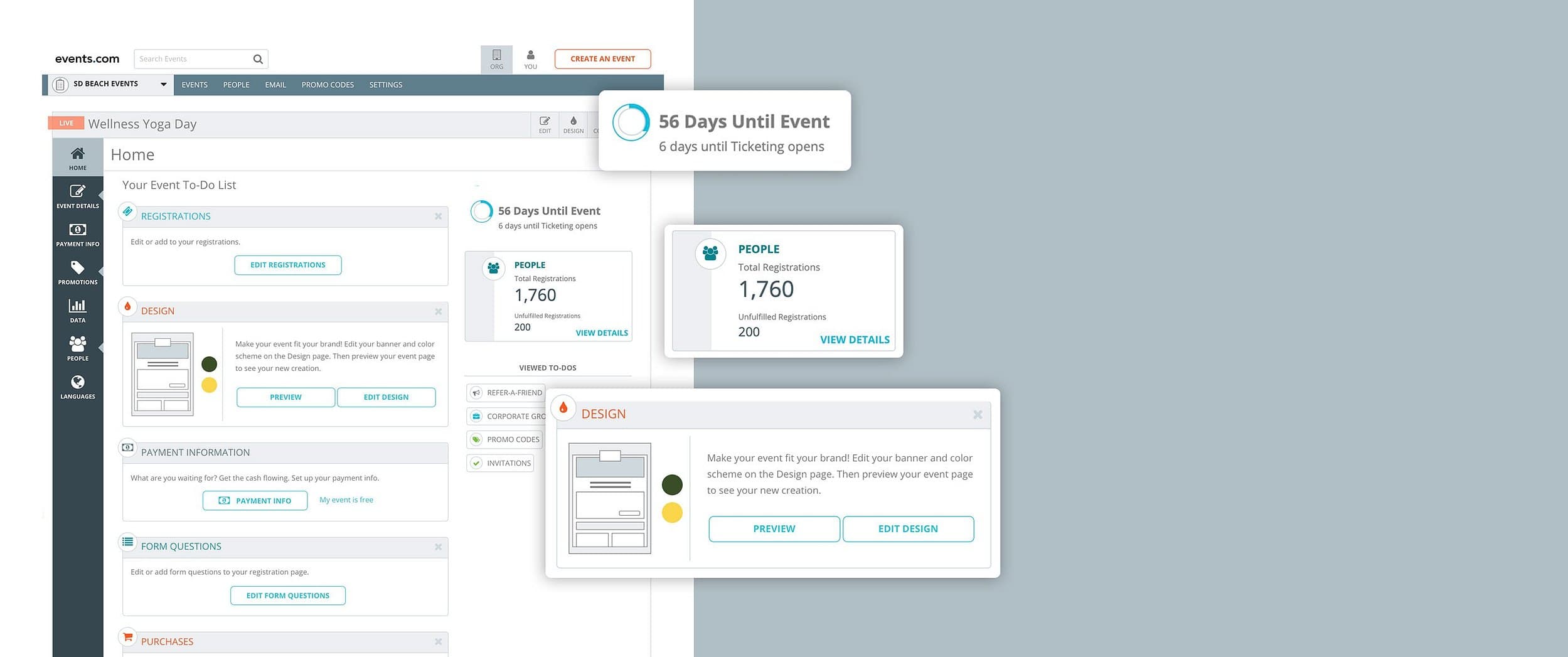
The Event Home Page replaced the edit-first experience with a checklist-based hub. Each task appeared as an interactive widget with three states, keeping the mental model simple and progress visible.
Incomplete
Surfaces required actions clearly at a glance
Completed
Provides positive reinforcement, reduces cognitive load
Dismissed
Lets organizers remove tasks irrelevant to their event type
A live dashboard panel alongside the checklist showed days until the event, ticketing launch date, and tickets sold, giving experienced organizers the at-a-glance snapshot they needed without overwhelming new users.
Outcomes & Impact
- —Second-round testing showed significantly higher engagement with the widget layout than the previous side navigation
- —New users successfully completed full event setup without support intervention
- —Experienced organizers adopted the dashboard as a go-to monitoring view
- —Reduced support ticket volume related to new user setup confusion