Automating People Management
AI · Claude Cowork · 2025
AI · People Management · Case Study
Using Claude Cowork to Automate People Management
How a Design Manager at Drata built a repeatable, AI-powered workflow for 1:1 prep, career tracking, and promotion readiness, then shared it with her team.
Role
Design Manager, AppDev
Company
Drata
Type
Workflow Automation
Timeline
March–April 2026
Overview
The problem with managing well
Managing a team well takes time that managers rarely have. Keeping track of each direct report's goals, accomplishments, and growth trajectory, while also showing up prepared to every 1:1, is an ongoing coordination challenge on top of an already full job.
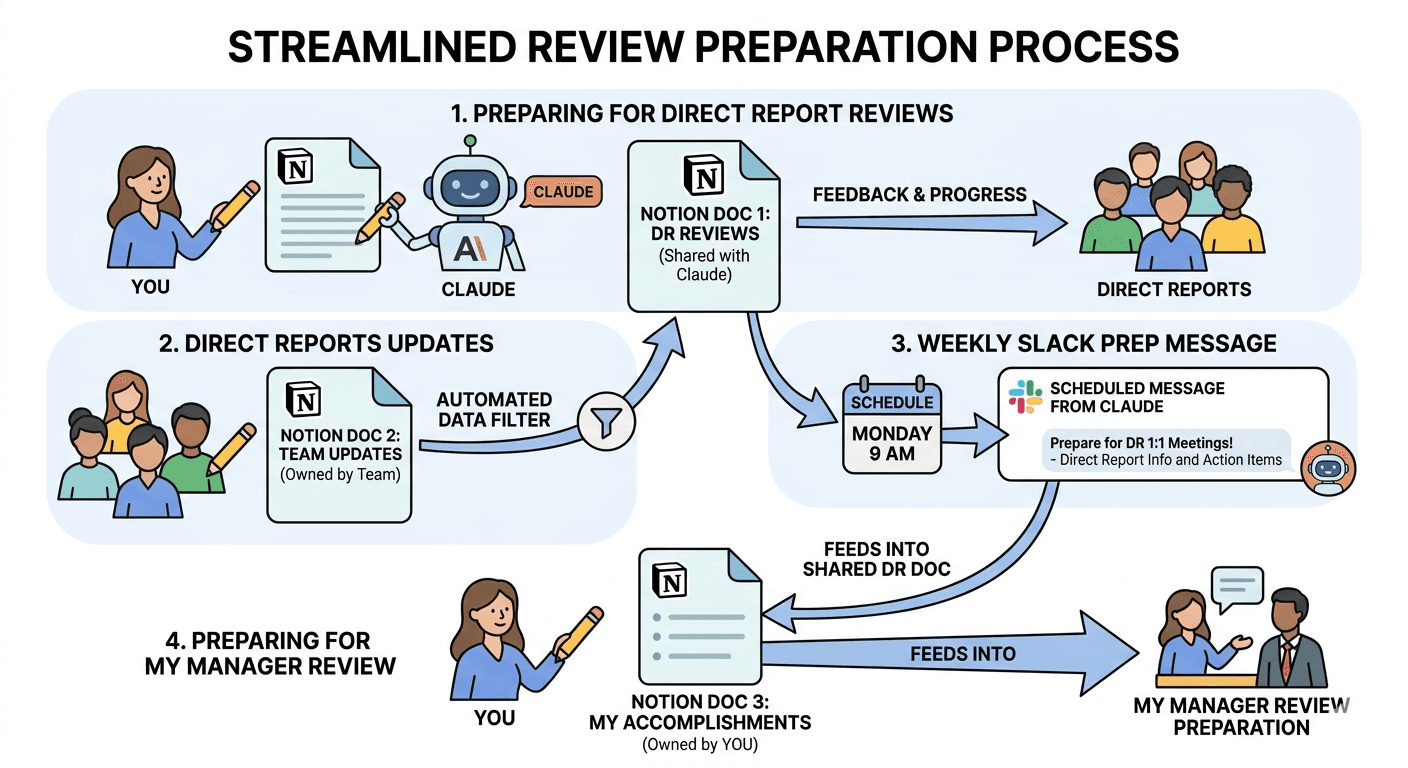
What started as an experiment with a single direct report's career page grew into a fully automated people management system. Today, every Monday morning, Claude reads my direct reports' Notion pages, updates their career documents, and posts ready-to-read 1:1 prep briefs to a private Slack channel before the week begins. I also extended the same pattern to my own career growth, using Claude to read my weekly work notes and maintain a living promotion case mapped against Drata's management competency framework.
This case study documents how that system was built, step by step, tool by tool, and how I then packaged it into a guide for other managers to adopt.
The Starting Point
Three designers, three growth paths
I manage three Product Designers at Drata, each with their own level and target:
| Direct Report | Current → Target Level |
|---|---|
| Felicia Hou | P5 (Senior Product Designer) → P6 |
| Marce Espinosa | P6 (Senior Product Designer) → P7 |
| Nicole Tenny | P7 → P8 |
Each person had a Notion page with their role, goals, and 1:1 notes. But turning those raw notes into structured career tracking, mapping work to Drata's competency framework, assessing promotion readiness, logging accomplishments, required significant manual effort after every meeting. My question: could Claude do that work automatically, so I could spend my time on the conversations themselves rather than the documentation?
Phase 1
Building the template
I started by working with Claude to co-design a consistent Notion page structure for each direct report. Rather than building it top-down, I described what information I wanted to track and let Claude suggest how to organize it. The result was a template with two kinds of sections: ones I own and write to, and ones Claude maintains automatically.
| Section | Who Manages It |
|---|---|
| Header (role, level, target level, manager, start date) | Cassie |
| Goals (current quarter + longer-term) | Cassie |
| 1:1 Notes (running log of meeting dates and topics) | Cassie |
| Manager Notes (private context, coaching observations) | Cassie only. Claude never reads or writes here. |
| Accomplishments Log (chronological wins by month) | Claude: updated weekly from 1:1 notes |
| Competency Snapshot (table: current evidence vs. gap) | Claude: maps work to Drata's competency framework |
| Promotion Readiness (rating, strengths, gaps, 30-day focus) | Claude: synthesized from all other sections |
The three Claude-maintained sections are what make the system valuable. Rather than manually updating a career tracker after every 1:1, Claude reads the notes section each week and writes evidence-based analysis. The Competency Snapshot maps each person's recent work directly to Drata's five competency areas (Product Strategy & Craft, Execution & Grit, Data & AI, Communication & Collaboration, and Leadership) at both their current and target levels. The Promotion Readiness section translates that into a plain-language readiness rating, specific strengths, development gaps, and a concrete 30-day focus.
Example: Felicia's Competency Snapshot (Data & AI)
Current evidence: Synthesizes research from Gong calls, ProductBoard, stakeholder workshops, and usability tests. No documented AI tool usage to date.
Gap / next step: Biggest gap. July 2026 goal requires 2 AI training sessions and a documented workflow improvement. April check-in approaching with no progress evidenced. Needs immediate focus.
Phase 2
Automating the weekly 1:1 brief
With the template in place, I set up a recurring scheduled task for each direct report. Every Monday morning at 8am, Claude automatically:
- •
Reads the direct report's Notion Career & Growth page
- •
Updates the three maintained sections (Accomplishments Log, Competency Snapshot, Promotion Readiness) based on any new 1:1 notes
- •
Posts a concise prep brief to a private Slack channel with the person's current standing, key talking points, and any areas that need attention
The result is that I start every week with three structured prep briefs already waiting in Slack, one for each direct report, before I've had my first coffee. The briefs aren't just reminders: they're specific, evidence-grounded summaries that surface what's changed, what's progressing, and what warrants attention in that week's conversation.
Phase 3
Giving direct reports a voice
After setting up the automation for all three direct reports, one of them, Felicia, mentioned in a 1:1 that she'd love to be able to add to the pages that feed into her career review. She wanted a place to log her own accomplishments between meetings, note blockers, and share what she was working on without waiting for me to document it.
This was a good piece of feedback: a system that only I could write to was missing the person most invested in the outcome.
The solution was to create shared Notion pages, one for each direct report, that both people could write to freely. Each shared page has two sections: an Accomplishments section for logging wins in their own words, and an Ongoing Notes space for anything worth capturing between meetings.
These shared pages now feed into each person's career review documentation. When Claude reads the Career & Growth page each Monday, it also picks up anything added to the shared page that week, incorporating it into the Accomplishments Log and Promotion Readiness analysis. The direct reports have real agency in shaping how their work is represented, and the automated workflow becomes a collaboration rather than something done to them.
Phase 4
Turning the pattern on myself
Once the system was running for my direct reports, I realized the same logic applied to my own career growth. I had been keeping a detailed weekly digest in Notion for months, a running log of everything I'd done each week as a manager and designer, going back to October 2025. The document was rich with evidence, but turning it into a structured case for my own promotion required hours of work I hadn't found time for.
I asked Claude to read my Weekly Digest and use it to create a living promotion case document, mapped against Drata's M7 Group Manager competency framework. The result was a detailed, evidence-backed document covering all five competency areas: Product Strategy & Craft, Execution & Grit, Data & AI, Communication & Collaboration, and Leadership.
For each criterion, Claude pulled specific evidence directly from the weekly notes: named projects, dated actions, manager decisions, and team moments. The document includes a Competency Scorecard showing all 20 criteria met, a detailed evidence section for each competency, an Areas to Develop section identifying the remaining gaps, and a summary that makes the case for promotion in my own voice.
From the promotion case: Data & AI
“The single strongest M7 signal in this document. Won the company Hackathon with an AI project. Led the full team AI mini-sprint. Delivered AI sizzle projects for Events and Action Panel. Built agentic AI provocations for Connections and Azure. Designed AI CoPilot vision for Monitoring. This is sustained, cross-surface AI product leadership over 6 months.”
The document is now a living artifact. As I add to my Weekly Digest each week, Claude can re-read it and update the promotion case with new evidence. I no longer have to choose between doing the work and documenting the work.
Phase 5
Building a guide for other managers
By the time the full system was running, I had built something replicable. Other managers on my team, particularly in the AppDev Engineering Managers group, asked how I'd set it up and whether they could adopt the same workflow.
Rather than explaining it from scratch in each conversation, I worked with Claude to build a how-to guide documenting the entire process. The guide covers:
- •
How to create a private Slack channel and add the Claude integration so prep briefs post there automatically
- •
The full Notion page template with every section, noting which ones Claude manages and which ones the manager owns
- •
Copy-paste prompts for the first-time setup, scheduling the weekly automation, running it on demand, and logging wins
- •
Tips for getting the best output (the richer the 1:1 notes, the better Claude's analysis)
- •
Troubleshooting steps for common issues (missing permissions, pages Claude can't find, paused scheduled tasks)
The guide is written so that any manager can follow it cold, no prior experience with Cowork or automation required.
What Changed
The impact
1:1 meetings are more substantive
Walking in with a structured prep brief that includes specific competency evidence and a suggested 30-day focus means conversations are less about "what are you working on" and more about the things that actually matter for someone's growth.
Career tracking is no longer a catch-up exercise
The Accomplishments Log and Competency Snapshot update continuously, so there's never a moment where I have to reconstruct what someone did over the past six months before a review cycle.
Direct reports have more ownership over their own growth narrative
The shared Notion pages give them a place to contribute to the documentation of their work, rather than having it entirely mediated through their manager.
My own promotion case writes itself over time
The Weekly Digest feeds into the living promotion document, so building the case for M7 is something that happens incrementally rather than in a stressful pre-review sprint.
The workflow is spreading
Other managers now have a guide they can follow to build the same system for their own teams.
Appendix
Key prompts that power the workflow
First-time template setup
I'd like you to look at [Name]'s Notion Career & Growth page and update it. Their current level is [e.g. P5] and their target level is [e.g. P6]. Please update or create these three sections: • Competency Snapshot: a table mapping their work to the Drata competency framework • Promotion Readiness: an overall readiness rating, summary, key strengths, areas to develop, and a suggested 30-day focus • Accomplishments Log: chronological entries pulled from their 1:1 notes, organized by month After updating Notion, post a message to [#channel-name] in Slack with a summary and 3–5 key talking points for our upcoming 1:1.
Scheduling the weekly automation
Every Monday morning at [time], can you look at [Name]'s Notion Career & Growth page, update it, and post their 1:1 prep notes to [#channel-name] in Slack?
Building the self-promotion case
Can you read my Weekly Digest in Notion and use it to build a promotion case document mapped against the M7 Group Manager competency framework? For each criterion, pull specific evidence from my notes. Include a scorecard, a section for each competency with evidence, and a summary. Also identify any areas where the evidence is thin and suggest how I could close those gaps.
On-demand run before a specific 1:1
I have a 1:1 with [Name] tomorrow. Can you pull their Notion page, update it, and post a prep brief to [#channel-name] in Slack?